Root File Manager4.23
Publisher Description
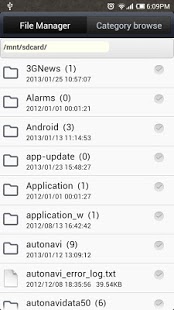
Root File Manager is a full-featured, easy to use file manager. Considerate of the classification so that you can quickly find the music, pictures, installation package, document, archive and other documents, no longer entangled in the N-level directory. Of course, we also provide you with a clear folder management, the most efficient copying, moving experience. In addition, if your phone had a successful root, RootExplorer biggest feature is its ability to remove mobile phone comes with applications such as GOOGLEMAP, CONTACTS, MARKET, GTALK and so on.
We love creating apps, and want to keep them free forever. In order to keep our development running we are using a search service to generate some revenue from this free app. This app will add a couple search links on your device in the form of an icon, bookmark link and browser homepage. You may delete them easily (drag to the trash or delete the link for the browser), if you choose to use them, thanks!
About Root File Manager
The company that develops Root File Manager is Microdu. The latest version released by its developer is 4.23. This app was rated by 1 users of our site and has an average rating of 3.0.
To install Root File Manager on your Android device, just click the green Continue To App button above to start the installation process. The app is listed on our website since 2014-02-11 and was downloaded 24 times. We have already checked if the download link is safe, however for your own protection we recommend that you scan the downloaded app with your antivirus. Your antivirus may detect the Root File Manager as malware as malware if the download link to com.microdu.FileManager is broken.
How to install Root File Manager on your Android device:
- Click on the Continue To App button on our website. This will redirect you to Google Play.
- Once the Root File Manager is shown in the Google Play listing of your Android device, you can start its download and installation. Tap on the Install button located below the search bar and to the right of the app icon.
- A pop-up window with the permissions required by Root File Manager will be shown. Click on Accept to continue the process.
- Root File Manager will be downloaded onto your device, displaying a progress. Once the download completes, the installation will start and you'll get a notification after the installation is finished.
Program Details
System requirements
Download information
Pricing
Version History
version 4.23
posted on 2014-02-11
version 3.23.12
posted on 2013-04-06
Several fixes and updates
